Finance template
Break-Even Analysis
Break-even units and revenue move the moment you change price or costs.
- ✓Instant download
- ✓Every later version free
- ✓Commercial use
- ✓No watermark
- 59
- live formulas, each one recalculated and checked
- 6
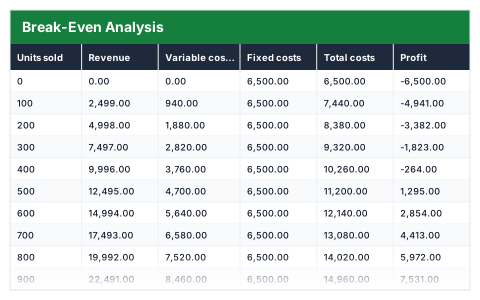
- columns: Units sold, Revenue, Variable costs, Fixed costs, Total costs, Profit
- 7
- figures worked out for you
Anyone pricing a product or a new venture · Startups and makers setting a price for the first time — usually looking for this when a price has been picked but nobody knows how many must sell.
Need more than one? All 11 Finance templates for $39 — $176 bought separately. All 66 for $99.
Works in Excel 2013 and later, Microsoft 365, Google Sheets and LibreOffice Calc. Set up to print on one page wide. Version 1, updated 25 September 2026.
There are free templates. Why this one?
There are, and some are fine. The difference is what has been checked. This file was built from scratch, then every formula in it was recalculated by a separate checker that compares each result against an independently worked-out answer — 59 of them here. A template that looks right and totals wrong is worse than no template at all, and that is the usual failing of one downloaded from a search result.
It also opens with sample rows already filled in, so you can see every formula working before you touch it, and it is set up to print without fighting the page setup. No watermark, and you can use it commercially.
About this Break-Even Analysis template
Break-even is the number of sales at which you stop losing money and start making it. This Excel break-even analysis takes your price per unit, variable cost per unit and fixed costs, and shows revenue, total costs and profit across a range of sales volumes.
It calculates contribution per unit, the break-even point in units and in revenue, and your margin of safety at 1,000 units.
Good for
- →Testing whether a new product or service can pay for itself
- →Seeing how a price change moves the break-even point
- →Setting a realistic minimum sales target
What it works out for you
Break-even
- →Contribution per unit
- →Break-even units
- →Break-even revenue
- →Margin of safety at 1000 units
What is inside the Break-Even Analysis template
The table has 6 columns. Calculated columns fill themselves in; the rest are yours to type over.
- →Units sold
- →Revenue
- →Variable costs
- →Fixed costs
- →Total costs
- →Profit
Settings in the “Inputs” box
- →Price per unit
- →Variable cost per unit
- →Fixed costs
How to use the Break-Even Analysis in Excel
Change the three shaded inputs below. The table and the break-even point follow immediately.
The file opens with sample rows so you can see every formula working before you change anything. Type your own figures over them. When you need more rows, insert them inside the existing block rather than underneath it, so the totals keep covering every row.
Shaded, boxed cells below the table are settings the formulas read from. Change those first — every row that depends on them updates at once.
Functions and formulas it uses
Every one of these exists in Excel, Google Sheets and LibreOffice, so the file behaves the same wherever you open it.
IFERRORROUNDUPQuestions about the Break-Even Analysis
What is contribution per unit?
The price per unit minus the variable cost per unit — what each sale contributes towards covering your fixed costs.
How is the break-even point calculated?
Fixed costs are divided by the contribution per unit and rounded up to whole units. Break-even revenue is those units multiplied by the price.
What does margin of safety mean?
How far sales can fall before you reach break-even. The template measures it at 1,000 units.
What you get with the Break-Even Analysis
- ✓59 formulas, every one recalculated and checked
- ✓Opens with sample rows already filled in
- ✓Excel, Google Sheets and LibreOffice Calc
- ✓Set up to print on one page wide
- ✓Commercial use, no attribution needed
- ✓Every later version included free
Get the Break-Even Analysis for $19
One payment. The file downloads straight away, and every later version of it is yours at no extra cost.
Buying a few? All 11 Finance templates for $39, or all 66 for $99.
More finance templates
See all Finance →
Break-Even Analysis
One payment, yours to keep