Business template
Cost of Employment Calculator
What a salary really costs once employer NI, pension and everything else is added on top.
- ✓Instant download
- ✓Every later version free
- ✓Commercial use
- ✓No watermark
- 58
- live formulas, each one recalculated and checked
- 9
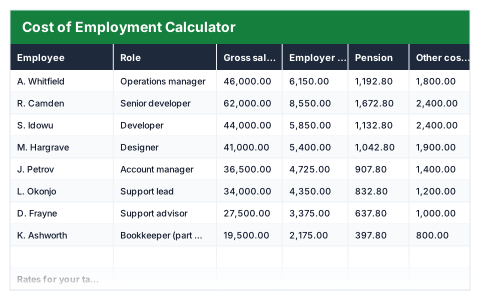
- columns: Employee, Role, Gross salary, Employer NI, Pension, Other costs, Total cost, On-cost, Cost per month
- 15
- figures worked out for you
An owner deciding whether they can afford a hire · Small businesses making their first hires — usually looking for this when a salary looks affordable but the real cost of employing is not known.
Need more than one? All 10 Business templates for $39 — $121 bought separately. All 66 for $99.
Works in Excel 2013 and later, Microsoft 365, Google Sheets and LibreOffice Calc. Set up to print landscape on one page wide. Version 1, updated 25 September 2026.
There are free templates. Why this one?
There are, and some are fine. The difference is what has been checked. This file was built from scratch, then every formula in it was recalculated by a separate checker that compares each result against an independently worked-out answer — 58 of them here. A template that looks right and totals wrong is worse than no template at all, and that is the usual failing of one downloaded from a search result.
It also opens with sample rows already filled in, so you can see every formula working before you touch it, and it is set up to print without fighting the page setup. No watermark, and you can use it commercially.
About this Cost of Employment Calculator template
A salary is never the full cost of employing someone. This Excel cost of employment calculator adds employer National Insurance, employer pension contributions and any other costs on top of each gross salary, and shows the total cost and the on-cost as a percentage.
Every rate and threshold is an input, so you set them to the figures for your tax year. The payroll summary shows the total cost of employment, the cost on top of salaries, the monthly payroll cost and the average cost per head.
Good for
- →Budgeting for a new hire before advertising the role
- →Small employers planning next year's payroll
- →Showing the real cost of a pay rise
What it works out for you
Payroll cost
- →Salaries
- →Employer NI
- →Employer pension
- →Other employment costs
- →Total cost of employment
- →Cost on top of salary
- →On-cost across the team
- →Monthly payroll cost
- →Average cost per head
- →Headcount
- →Highest single cost of employment
What is inside the Cost of Employment Calculator template
The table has 9 columns. Calculated columns fill themselves in; the rest are yours to type over.
- →Employee
- →Role
- →Gross salary
- →Employer NI
- →Pension
- →Other costs
- →Total cost
- →On-cost
- →Cost per month
Settings in the “Rates for your tax year” box
- →Employer NI rate
- →Employer NI threshold (per year)
- →Employer pension contribution
- →Pension is paid on earnings above
How to use the Cost of Employment Calculator in Excel
Every rate and threshold is an input, so set them to the figures for your tax year and the whole sheet follows. Not payroll software — a planning tool.
The file opens with sample rows so you can see every formula working before you change anything. Type your own figures over them. When you need more rows, insert them inside the existing block rather than underneath it, so the totals keep covering every row.
Shaded, boxed cells below the table are settings the formulas read from. Change those first — every row that depends on them updates at once.
Functions and formulas it uses
Every one of these exists in Excel, Google Sheets and LibreOffice, so the file behaves the same wherever you open it.
COUNTIFERRORMAXSUMQuestions about the Cost of Employment Calculator
Are the National Insurance and pension rates up to date?
The rates and thresholds are inputs you set, so the file never goes out of date. Check HMRC's current figures for your tax year and enter them once.
Is this payroll software?
No. It is a planning tool for estimating costs. It does not work out employee deductions or produce payslips.
What goes in 'Other costs'?
Anything else you pay because someone works for you, such as equipment, software licences, training or benefits.
What you get with the Cost of Employment Calculator
- ✓58 formulas, every one recalculated and checked
- ✓Opens with sample rows already filled in
- ✓Excel, Google Sheets and LibreOffice Calc
- ✓Set up to print landscape, one page wide
- ✓Commercial use, no attribution needed
- ✓Every later version included free
Get the Cost of Employment Calculator for $19
One payment. The file downloads straight away, and every later version of it is yours at no extra cost.
Buying a few? All 10 Business templates for $39, or all 66 for $99.
More business templates
See all Business →
Cost of Employment Calculator
One payment, yours to keep