Finance template
Loan Amortisation Schedule
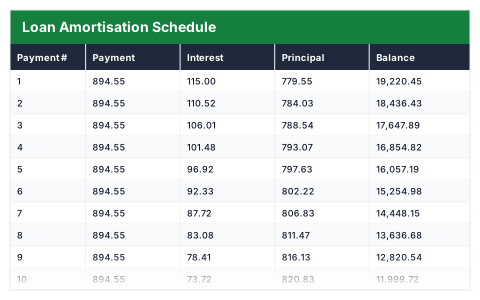
PMT-driven schedule — change the amount, rate or term and all payments redo themselves.
- ✓Instant download
- ✓Every later version free
- ✓Commercial use
- ✓No watermark
- 102
- live formulas, each one recalculated and checked
- 5
- columns: Payment #, Payment, Interest, Principal, Balance
- 6
- figures worked out for you
A borrower checking what a loan really costs · Anyone financing equipment or premises — usually looking for this when the lender quoted a monthly payment, not the total interest.
Need more than one? All 11 Finance templates for $39 — $176 bought separately. All 66 for $99.
Works in Excel 2013 and later, Microsoft 365, Google Sheets and LibreOffice Calc. Set up to print on one page wide. Version 1, updated 25 September 2026.
There are free templates. Why this one?
There are, and some are fine. The difference is what has been checked. This file was built from scratch, then every formula in it was recalculated by a separate checker that compares each result against an independently worked-out answer — 102 of them here. A template that looks right and totals wrong is worse than no template at all, and that is the usual failing of one downloaded from a search result.
It also opens with sample rows already filled in, so you can see every formula working before you touch it, and it is set up to print without fighting the page setup. No watermark, and you can use it commercially.
About this Loan Amortisation Schedule template
An amortisation schedule shows how each loan payment is split between interest and paying down what you owe. This Excel template works out the monthly payment with the PMT function, then lays out every payment with its interest, principal and remaining balance.
Change the loan amount, annual interest rate or term and the whole schedule rebuilds, along with the total interest and the total you will repay.
Good for
- →Checking a quoted loan payment before you sign
- →Comparing how a shorter term changes the total interest
- →Seeing how slowly the balance falls in the early years
What it works out for you
Result
- →Monthly payment
- →Total interest
- →Total repaid
What is inside the Loan Amortisation Schedule template
The table has 5 columns. Calculated columns fill themselves in; the rest are yours to type over.
- →Payment #
- →Payment
- →Interest
- →Principal
- →Balance
Settings in the “Loan details” box
- →Loan amount
- →Annual interest rate
- →Term (months)
How to use the Loan Amortisation Schedule in Excel
Change the three shaded inputs below the table. Every payment row, the interest split and the totals recalculate from them.
The file opens with sample rows so you can see every formula working before you change anything. Type your own figures over them. When you need more rows, insert them inside the existing block rather than underneath it, so the totals keep covering every row.
Shaded, boxed cells below the table are settings the formulas read from. Change those first — every row that depends on them updates at once.
Functions and formulas it uses
Every one of these exists in Excel, Google Sheets and LibreOffice, so the file behaves the same wherever you open it.
IFIFERRORMAXMINPMTSUMQuestions about the Loan Amortisation Schedule
How is the monthly payment calculated?
With Excel's PMT function, using the annual rate divided by 12, the term in months and the loan amount — the standard fixed-payment calculation.
Why is so much of each early payment interest?
Interest is charged on the outstanding balance, which is highest at the start. As the balance falls, less of each payment goes on interest and more pays down the loan.
Does it handle overpayments?
No — it assumes the same payment every month. For extra monthly payments, the Mortgage Overpayment Calculator shows the interest saved and the months knocked off.
What you get with the Loan Amortisation Schedule
- ✓102 formulas, every one recalculated and checked
- ✓Opens with sample rows already filled in
- ✓Excel, Google Sheets and LibreOffice Calc
- ✓Set up to print on one page wide
- ✓Commercial use, no attribution needed
- ✓Every later version included free
Get the Loan Amortisation Schedule for $19
One payment. The file downloads straight away, and every later version of it is yours at no extra cost.
Buying a few? All 11 Finance templates for $39, or all 66 for $99.
More finance templates
See all Finance →
Loan Amortisation Schedule
One payment, yours to keep