Data template
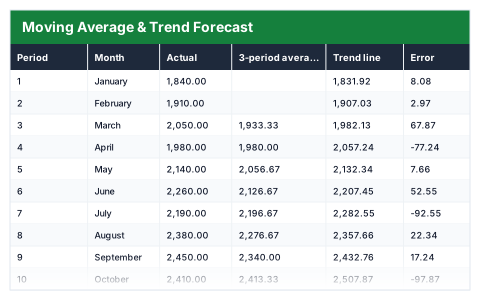
Moving Average & Trend Forecast
A three-month moving average, a fitted trend line and the next three periods, with the error measured.
- ✓Instant download
- ✓Every later version free
- ✓Commercial use
- ✓No watermark
- 74
- live formulas, each one recalculated and checked
- 8
- columns: Period, Month, Actual, 3-period average, Trend line, Error, Absolute % error, Change on last period
- 15
- figures worked out for you
Anyone forecasting from past figures · Businesses with seasonal or noisy demand — usually looking for this when history exists but no projection has been made from it.
Need more than one? All 9 Data templates for $39 — $119 bought separately. All 66 for $99.
Works in Excel 2013 and later, Microsoft 365, Google Sheets and LibreOffice Calc. Set up to print landscape on one page wide. Version 1, updated 25 September 2026.
There are free templates. Why this one?
There are, and some are fine. The difference is what has been checked. This file was built from scratch, then every formula in it was recalculated by a separate checker that compares each result against an independently worked-out answer — 74 of them here. A template that looks right and totals wrong is worse than no template at all, and that is the usual failing of one downloaded from a search result.
It also opens with sample rows already filled in, so you can see every formula working before you touch it, and it is set up to print without fighting the page setup. No watermark, and you can use it commercially.
About this Moving Average & Trend Forecast template
A simple, transparent forecast is often more useful than a complicated one nobody trusts. This Excel template takes a history of monthly figures, calculates a three-period moving average and a least-squares trend line, then extends the trend to forecast the next three periods.
It measures the error for every period and shows the fit quality (R²) and the mean absolute percentage error, so you can see how far to trust the forecast.
Good for
- →Forecasting next quarter's sales or demand
- →Smoothing noisy monthly figures to see the trend
- →Planning stock or staffing from past volumes
What it works out for you
The trend, and what comes next
- →Periods of history
- →Average
- →Trend per period
- →Trend at period zero
- →Fit quality (R²)
- →Average absolute % error (MAPE)
- →Forecast for period 13
- →Forecast for period 14
- →Forecast for period 15
- →Next three periods combined
- →Growth over the history
- →Average change per period
- →Best period
- →Worst period
- →Direction
What is inside the Moving Average & Trend Forecast template
The table has 8 columns. Calculated columns fill themselves in; the rest are yours to type over.
- →Period
- →Month
- →Actual
- →3-period average
- →Trend line
- →Error
- →Absolute % error
- →Change on last period
How to use the Moving Average & Trend Forecast in Excel
Replace the Actual column with your own figures. The trend line is a least-squares fit; the forecast extends it, and MAPE tells you how much to trust it.
The file opens with sample rows so you can see every formula working before you change anything. Type your own figures over them. When you need more rows, insert them inside the existing block rather than underneath it, so the totals keep covering every row.
Functions and formulas it uses
Every one of these exists in Excel, Google Sheets and LibreOffice, so the file behaves the same wherever you open it.
ABSAVERAGECOUNTIFIFERRORMAXMINRSQSLOPEQuestions about the Moving Average & Trend Forecast
What is a moving average?
The average of the latest three periods, recalculated each month. It smooths out short-term ups and downs so the direction is easier to see.
What does MAPE tell me?
The mean absolute percentage error: on average, how far the trend line sat from the actual figures, as a percentage. Lower is better.
Does it handle seasonality?
No. It fits a straight-line trend, so for strongly seasonal data treat the forecast as a baseline rather than a prediction.
What you get with the Moving Average & Trend Forecast
- ✓74 formulas, every one recalculated and checked
- ✓Opens with sample rows already filled in
- ✓Excel, Google Sheets and LibreOffice Calc
- ✓Set up to print landscape, one page wide
- ✓Commercial use, no attribution needed
- ✓Every later version included free
Get the Moving Average & Trend Forecast for $19
One payment. The file downloads straight away, and every later version of it is yours at no extra cost.
Buying a few? All 9 Data templates for $39, or all 66 for $99.
More data templates
See all Data →
Moving Average & Trend Forecast
One payment, yours to keep