Projects template
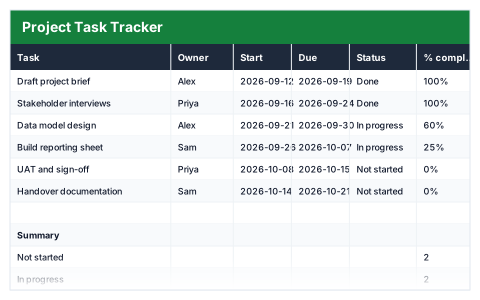
Project Task Tracker
Tasks with owners and dates, plus a live count of what is done and overdue.
Free
Free with an account, and then yours to edit and use commercially.
- 11
- live formulas, each one recalculated and checked
- 7
- columns: Task, Owner, Start, Due, Status, % complete, Days left
- 5
- figures worked out for you
Anyone running a project without project software · Small teams not on Jira or Asana — usually looking for this when a project has more moving parts than a to-do list can hold.
Works in Excel 2013 and later, Microsoft 365, Google Sheets and LibreOffice Calc. Set up to print on one page wide. Version 1, updated 25 September 2026.
About this Project Task Tracker template
A project task list is only useful if it shows what is running late. This free Excel project task tracker lists every task with its owner, start and due dates, status and percentage complete, and counts the days left against today's date.
The summary counts tasks not started, in progress, done and overdue, and shows the average completion across the project.
Good for
- →Small teams running a project without dedicated software
- →A personal to-do list with deadlines
- →A quick status update for a weekly meeting
What it works out for you
Summary
- →Not started
- →In progress
- →Done
- →Overdue
- →Average completion
What is inside the Project Task Tracker template
The table has 7 columns. Calculated columns fill themselves in; the rest are yours to type over.
- →Task
- →Owner
- →Start
- →Due
- →Status
- →% complete
- →Days left
How to use the Project Task Tracker in Excel
Days left counts from today, so it is never stale. Use the Status dropdown — the summary counts depend on the exact wording.
The file opens with sample rows so you can see every formula working before you change anything. Type your own figures over them. When you need more rows, insert them inside the existing block rather than underneath it, so the totals keep covering every row.
Functions and formulas it uses
Every one of these exists in Excel, Google Sheets and LibreOffice, so the file behaves the same wherever you open it.
AVERAGECOUNTIFCOUNTIFSIFTODAYQuestions about the Project Task Tracker
How does it spot overdue tasks?
It checks each task's due date against today's date together with its status, so a task past its due date that is not done is counted as overdue.
Why does the Status dropdown matter?
The summary counts use the exact status wording. Picking from the dropdown keeps those counts accurate.
Does it draw a timeline?
No. For bars across weeks, the Gantt Chart template draws itself from a start week and a duration.
What you get with the Project Task Tracker
- ✓11 formulas, every one recalculated and checked
- ✓Opens with sample rows already filled in
- ✓Excel, Google Sheets and LibreOffice Calc
- ✓Set up to print on one page wide
- ✓Yours to edit and use commercially
- ✓Free, and it stays in your library
Take the Project Task Tracker
Free. Sign in, or make an account, and it downloads.
More projects templates
See all Projects →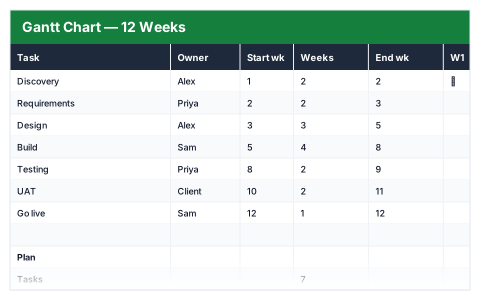
Project Task Tracker
Free — your email, then the file