Projects template
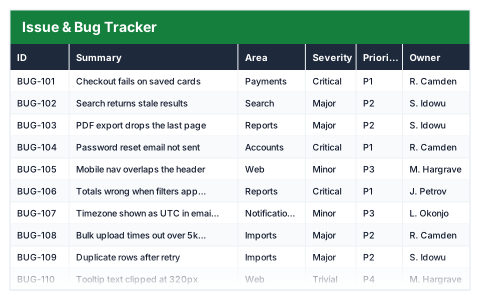
Issue & Bug Tracker
Issues scored by severity and priority, aged against today, with the open queue counted for you.
- ✓Instant download
- ✓Every later version free
- ✓Commercial use
- ✓No watermark
- 49
- live formulas, each one recalculated and checked
- 11
- columns: ID, Summary, Area, Severity, Priority, Owner, Status, Reported, Resolved, Age (days), Breached?
- 11
- figures worked out for you
A dev lead or QA triaging defects · Small software teams and agencies — usually looking for this when bugs are reported in chat and lost.
Need more than one? All 9 Projects templates for $39 — $114 bought separately. All 66 for $99.
Works in Excel 2013 and later, Microsoft 365, Google Sheets and LibreOffice Calc. Set up to print landscape on one page wide. Version 1, updated 25 September 2026.
There are free templates. Why this one?
There are, and some are fine. The difference is what has been checked. This file was built from scratch, then every formula in it was recalculated by a separate checker that compares each result against an independently worked-out answer — 49 of them here. A template that looks right and totals wrong is worse than no template at all, and that is the usual failing of one downloaded from a search result.
It also opens with sample rows already filled in, so you can see every formula working before you touch it, and it is set up to print without fighting the page setup. No watermark, and you can use it commercially.
About this Issue & Bug Tracker template
A bug list is only useful if it shows what is urgent and what has waited too long. This Excel issue and bug tracker records each issue's severity, priority, owner and status, and counts its age from the date reported until it is resolved.
Issues open longer than your resolve target are flagged, and the queue summary shows open and resolved issues, critical and P1 issues still open, the oldest open issue and the average days to resolve.
Good for
- →Small software teams without a dedicated tracker
- →Logging defects during user acceptance testing
- →IT support teams keeping a simple ticket list
What it works out for you
The queue
- →Issues logged
- →Still open
- →Resolved
- →Critical still open
- →P1 issues open
- →Past the resolve target
- →Oldest open issue (days)
- →Average age of all issues
- →Average days to resolve
- →Resolved share
What is inside the Issue & Bug Tracker template
The table has 11 columns. Calculated columns fill themselves in; the rest are yours to type over.
- →ID
- →Summary
- →Area
- →Severity
- →Priority
- →Owner
- →Status
- →Reported
- →Resolved
- →Age (days)
- →Breached?
Settings in the “Target” box
- →Resolve open issues within (days)
How to use the Issue & Bug Tracker in Excel
Leave Resolved blank while an issue is open — age counts from Reported to today, and stops on the day it is resolved.
The file opens with sample rows so you can see every formula working before you change anything. Type your own figures over them. When you need more rows, insert them inside the existing block rather than underneath it, so the totals keep covering every row.
Shaded, boxed cells below the table are settings the formulas read from. Change those first — every row that depends on them updates at once.
Functions and formulas it uses
Every one of these exists in Excel, Google Sheets and LibreOffice, so the file behaves the same wherever you open it.
ANDAVERAGEAVERAGEIFCOUNTACOUNTIFCOUNTIFSIFIFERRORISBLANKMAXTODAYQuestions about the Issue & Bug Tracker
How is the age of an issue calculated?
From the reported date to today while the issue is open, and from the reported date to the resolved date once it is closed.
What is the resolve target?
The number of days you aim to resolve issues within. Set it once and any open issue older than that is marked Breached.
What is the difference between severity and priority?
Severity is how bad the problem is; priority is how soon it should be fixed. A severe bug in a rarely used feature can still be low priority.
What you get with the Issue & Bug Tracker
- ✓49 formulas, every one recalculated and checked
- ✓Opens with sample rows already filled in
- ✓Excel, Google Sheets and LibreOffice Calc
- ✓Set up to print landscape, one page wide
- ✓Commercial use, no attribution needed
- ✓Every later version included free
Get the Issue & Bug Tracker for $12
One payment. The file downloads straight away, and every later version of it is yours at no extra cost.
Buying a few? All 9 Projects templates for $39, or all 66 for $99.
More projects templates
See all Projects →
Issue & Bug Tracker
One payment, yours to keep