HR template
Recruitment Pipeline Tracker
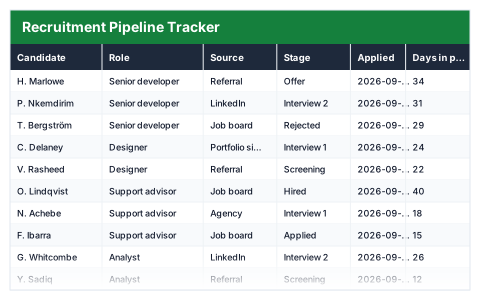
Candidates by stage and source, aged against today, with the funnel conversion worked out.
- ✓Instant download
- ✓Every later version free
- ✓Commercial use
- ✓No watermark
- 56
- live formulas, each one recalculated and checked
- 9
- columns: Candidate, Role, Source, Stage, Applied, Days in process, Next step, Owner, Stalled?
- 15
- figures worked out for you
A hiring manager running several roles at once · Companies hiring without an ATS — usually looking for this when candidates are spread across inboxes and going cold.
Need more than one? All 9 HR templates for $39 — $119 bought separately. All 66 for $99.
Works in Excel 2013 and later, Microsoft 365, Google Sheets and LibreOffice Calc. Set up to print landscape on one page wide. Version 1, updated 25 September 2026.
There are free templates. Why this one?
There are, and some are fine. The difference is what has been checked. This file was built from scratch, then every formula in it was recalculated by a separate checker that compares each result against an independently worked-out answer — 56 of them here. A template that looks right and totals wrong is worse than no template at all, and that is the usual failing of one downloaded from a search result.
It also opens with sample rows already filled in, so you can see every formula working before you touch it, and it is set up to print without fighting the page setup. No watermark, and you can use it commercially.
About this Recruitment Pipeline Tracker template
Good candidates accept other offers while applications sit unanswered. This Excel recruitment pipeline tracker records every candidate's role, source, stage and application date, and counts the days they have been in the process.
Candidates waiting longer than your target are flagged as stalled, and the funnel summary counts candidates at each stage, the conversion from application to interview and from interview to offer, and the average days to hire.
Good for
- →Small businesses hiring without an applicant tracking system
- →Managing several open roles at once
- →Seeing which sources produce candidates who get hired
What it works out for you
Funnel
- →Candidates in total
- →Applied
- →Screening
- →First interview
- →Second interview
- →Offer
- →Hired
- →Rejected or withdrawn
- →Application to interview rate
- →Interview to offer rate
- →Average days in process
- →Average days to hire
- →Stalled candidates
- →Came from referrals
What is inside the Recruitment Pipeline Tracker template
The table has 9 columns. Calculated columns fill themselves in; the rest are yours to type over.
- →Candidate
- →Role
- →Source
- →Stage
- →Applied
- →Days in process
- →Next step
- →Owner
- →Stalled?
Settings in the “Service level” box
- →Flag a candidate as stalled after (days)
How to use the Recruitment Pipeline Tracker in Excel
One row per candidate. Days in process runs from the application date to today, so stalled candidates surface without anyone chasing.
The file opens with sample rows so you can see every formula working before you change anything. Type your own figures over them. When you need more rows, insert them inside the existing block rather than underneath it, so the totals keep covering every row.
Shaded, boxed cells below the table are settings the formulas read from. Change those first — every row that depends on them updates at once.
Functions and formulas it uses
Every one of these exists in Excel, Google Sheets and LibreOffice, so the file behaves the same wherever you open it.
ANDAVERAGEAVERAGEIFCOUNTACOUNTIFIFIFERRORMAXTODAYQuestions about the Recruitment Pipeline Tracker
What makes a candidate stalled?
Someone still in the process — not hired, rejected or withdrawn — who has been waiting longer than the number of days you set.
How are the conversion rates calculated?
Application to interview is the share of all candidates who reached an interview or beyond. Interview to offer is the share of interviewed candidates who reached an offer or were hired.
Is it OK to keep candidate details in a spreadsheet?
Keep the file access-controlled and delete details you no longer need. Candidate information is personal data under UK GDPR.
What you get with the Recruitment Pipeline Tracker
- ✓56 formulas, every one recalculated and checked
- ✓Opens with sample rows already filled in
- ✓Excel, Google Sheets and LibreOffice Calc
- ✓Set up to print landscape, one page wide
- ✓Commercial use, no attribution needed
- ✓Every later version included free
Get the Recruitment Pipeline Tracker for $19
One payment. The file downloads straight away, and every later version of it is yours at no extra cost.
Buying a few? All 9 HR templates for $39, or all 66 for $99.
More hr templates
See all HR →
Recruitment Pipeline Tracker
One payment, yours to keep